Start now. Add details later.
Start your timer immediately. Add a description and select a project before you stop.
 Sign in
Track · Focus · Achieve
Trackly brings your timers, projects, clients, and team time logs into one shared workspace.
Start tracking for free →Start your timer immediately. Add a description and select a project before you stop.
Connect work to clients and projects, review time logs, and export reports.
Admins manage the workspace and review team time. Employees track their own work on assigned projects.
A look inside the Trackly browser extension: start tracking, review recent logs, and open time-entry details.
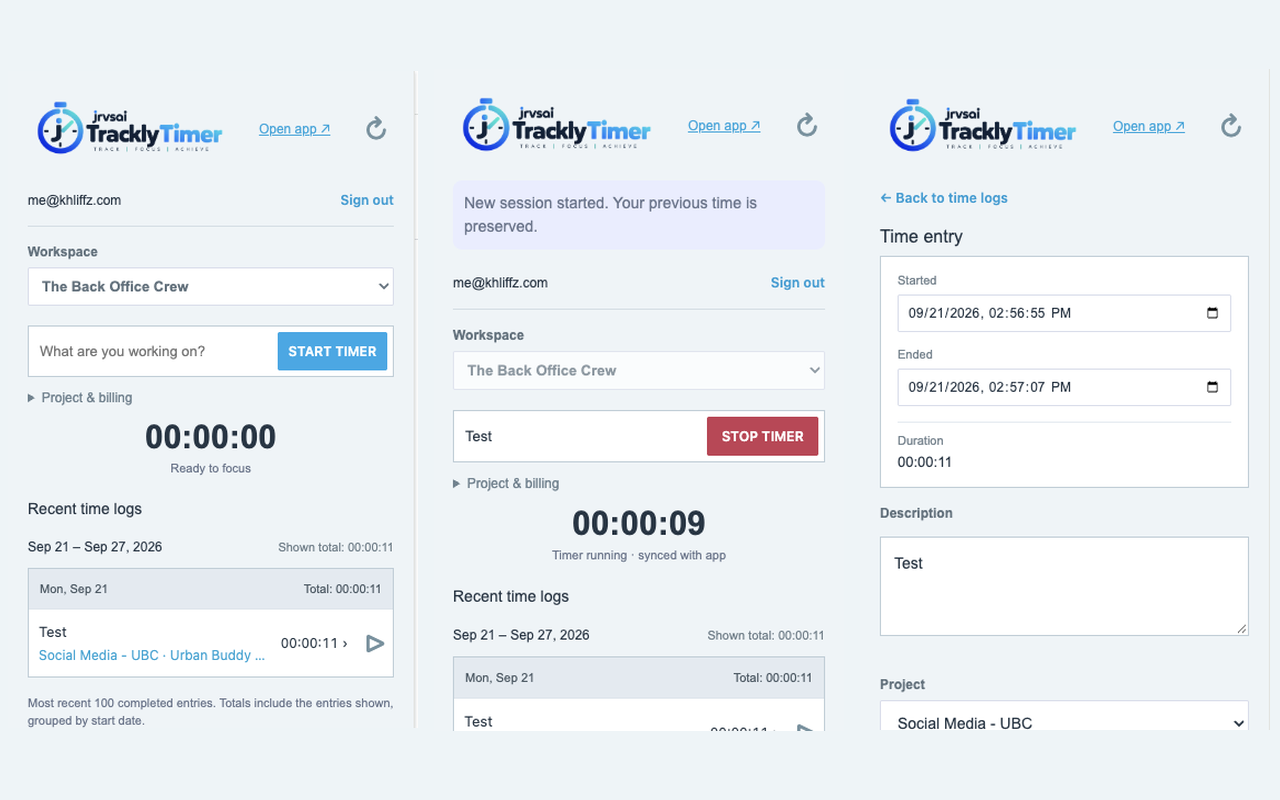
Browser extension preview. Your workspace data syncs with the web dashboard.
Start tracking for free during beta. Monthly and annual paid plans are coming soon.
$0 / month
$4.99 / month
Billed monthly when available.
Paid plans are on the way. Features and plan details will be announced before launch.
$50 / year
Billed annually when available.
Paid plans are on the way. Features and plan details will be announced before launch.
Create your free account, confirm your email if prompted, and create a workspace or accept a team invitation.
Employees track their own time on assigned projects. Workspace admins manage clients, projects, and members, and can review team time.
No. The extension does not read visited webpages or collect browsing history. You choose when to start and stop tracking.